WordPress plugin
Team Members PRO
Team Members PRO includes presentation and organization settings for staff, employees, and other groups on a WordPress site. Manage people in the Teams section of the admin panel. Member profiles can include a first and last name, position, bio, photo, and social links.
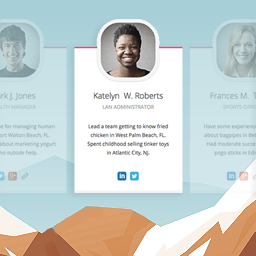
Team Members PRO includes presentation and organization settings for staff, employees, and other groups on a WordPress site. Manage people in the Teams section of the admin panel. Member profiles can include a first and last name, position, bio, photo, and social links.
Use the plugin’s shortcode to place a team on a page. The same setup can introduce company staff, agency members, project groups, or other people you want to present together.
What determines the team layout
Choose to display one to five members per line, set the display order to default or random, and reorder members to control their sequence. These settings shape how profiles are arranged on the page.
How profile presentation changes
Team Members PRO offers several ways to control what users see. Use full-width pictures, conceal selected members, or put extra details in a more-info reveal box. A separate picture can appear when someone hovers over a member, and picture filters adjust the treatment of profile photos. The equal-height option helps align entries when their content differs in length. Per-member color controls let profiles use individual colors.
When members move between teams
Import or export members from one team to another when reorganizing people into departments or project groups. Each profile can also have two additional social links, alongside links such as Facebook, X, or Instagram.
Set up and publish a team
- Open Teams in the WordPress admin panel and add member names, positions, bios, photos, and social links.
- Reorder members and select how many to show per line.
- Apply picture, color, visibility, or reveal options where needed.
- Use import and export to move members between teams.
- Add the team shortcode to the page where the profiles should appear, then review the layout.